Holiday Minimalist: A Practical Guide to Integrating a Casual Display Font into Real Workflows
Understanding Holiday Minimalist in the Context of Design Workflows
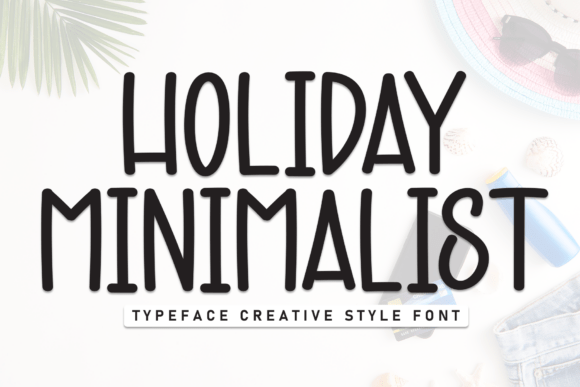
Holiday Minimalist is a casual display font that brings together modern simplicity and a playful, approachable aesthetic. Its clean shapes, soft edges, and balanced letterforms make it an excellent choice for projects that require both clarity and personality. Whether you're designing a poster, crafting brand assets, or creating social media content, Holiday Minimalist offers a versatile visual tone that enhances readability without overwhelming the viewer.
As part of a broader design process, this font fits well in stages where visual tone and audience engagement are key considerations. It can serve as a unifying element across different deliverables, helping maintain consistency in branding or thematic design projects.
Using Holiday Minimalist Before the Project Begins
Before diving into the execution phase, designers and marketers often define the visual identity of a project. Holiday Minimalist can be a valuable tool during this planning stage. Its aesthetic qualities—soft, friendly, and modern—can influence early decisions about color schemes, layout structure, and overall tone.
For example, when preparing for a seasonal campaign or product launch, selecting Holiday Minimalist as the primary display font can help communicate a relaxed yet polished vibe. This decision can guide the selection of supporting fonts, imagery styles, and even photography filters to ensure a cohesive look.
- Use it in mood boards to visualize brand tone
- Incorporate it into early mockups for client presentations
- Test its compatibility with other typographic elements
Integrating Holiday Minimalist During the Creative Process
During active design phases, Holiday Minimalist proves especially useful in projects that benefit from a casual yet professional appearance. Its readability at larger sizes makes it ideal for headlines, titles, and call-to-action elements in both print and digital formats.
Designers working in Adobe Creative Suite or Figma can easily import the font and apply it to key visual components. Whether you're designing packaging, social media templates, or digital ads, Holiday Minimalist adapts well to layered compositions without sacrificing legibility.
- Pair it with a clean sans-serif like Helvetica or Lato for body text
- Use it in branding kits for lifestyle, wellness, or creative businesses
- Apply it in packaging design for a soft, inviting impression
One practical example is in the development of a seasonal product line. A small business owner launching a holiday collection might use Holiday Minimalist across product labels, website banners, and Instagram stories. This ensures a consistent visual thread that customers can easily recognize and associate with the brand.
Post-Production and Long-Term Use Considerations
Once a project is complete, the value of Holiday Minimalist continues in terms of brand recall and long-term consistency. Fonts play a subtle but powerful role in brand recognition, and using Holiday Minimalist across multiple touchpoints reinforces a cohesive identity.
For marketers and business owners, maintaining a consistent typographic style across campaigns helps build familiarity. Holiday Minimalist's distinct yet approachable look makes it a strong candidate for ongoing use, especially in industries like hospitality, lifestyle, and creative services.
When archiving design files, it's important to note font usage and licensing to ensure future compatibility. If multiple team members or external collaborators are involved, embedding or sharing the font files securely can prevent display inconsistencies across devices.
Compatibility and Integration with Other Tools
Holiday Minimalist works well with a variety of design platforms and file formats. Whether you're using Canva for quick social media posts or Illustrator for detailed vector graphics, the font maintains its integrity across different environments.
For web designers, embedding Holiday Minimalist via @font-face in CSS is straightforward. However, it's essential to check licensing agreements to ensure proper usage on live websites. When used correctly, it adds a unique visual flair to landing pages, banners, and digital signage without compromising load times or accessibility.
Integration with project management tools like Trello or Notion may not be direct, but teams can use the font in visual assets linked from those platforms. For example, a marketing team might create branded templates in Figma using Holiday Minimalist and then share them via Notion for internal review and documentation.
Practical Tips for Implementation
Here are some actionable steps to help you incorporate Holiday Minimalist into your workflow effectively:
- Start with a sample layout: Test the font in a small-scale project before committing to full implementation.
- Establish typographic rules: Define how and where Holiday Minimalist will be used (e.g., headlines only, specific brand assets).
- Check readability across sizes: While the font is designed for display use, ensure it remains legible at different scales.
- Backup with system fonts: In digital applications, define fallback fonts in case Holiday Minimalist doesn’t load properly.
Workflow Examples and Use Cases
Let’s look at a few real-world examples of how Holiday Minimalist can fit into different creative and business workflows:
- Branding Package: A freelance designer creates a new brand identity for a wellness startup. Holiday Minimalist is used in the logo, social media templates, and promotional materials to convey approachability and calm.
- Product Packaging: An artisanal food brand uses the font on product labels to create a warm, inviting aesthetic that appeals to eco-conscious consumers.
- Online Course Marketing: An educator launching a self-paced course uses Holiday Minimalist in promotional videos and landing page headers to create a friendly, engaging tone.
In each of these scenarios, the font plays a supporting role in shaping the audience's emotional response. It’s not just about aesthetics—it’s about creating a visual language that aligns with the project’s goals and values.
Long-Term Value and Consistency
Fonts like Holiday Minimalist offer long-term benefits when used strategically. Over time, consistent application of a signature font builds brand equity. Customers begin to associate the typographic style with your business, which can enhance recognition and trust.
To maintain this consistency, consider creating a shared design system or style guide that includes guidelines for using Holiday Minimalist. This is especially useful for teams or agencies working across multiple projects and clients.
Additionally, revisiting font usage annually or biannually can help ensure it still aligns with evolving brand strategies. If you decide to refresh your visual identity, Holiday Minimalist can either remain a core element or transition smoothly into a complementary role.
Conclusion and Next Steps
Incorporating Holiday Minimalist into your workflow is more than just choosing a font—it's about selecting a visual tool that enhances communication, supports branding efforts, and integrates seamlessly with your creative process. Whether you're a solo creator or part of a larger team, understanding how to implement and maintain this font ensures it contributes positively to your projects over time.
Begin by experimenting with a single use case, then expand its application as you see how it aligns with your design goals. As with any design asset, the key is thoughtful implementation and consistent use across touchpoints to build a cohesive and recognizable presence.