Say Hello to Billyand: A Refined Vintage Italic Typeface for Modern Design
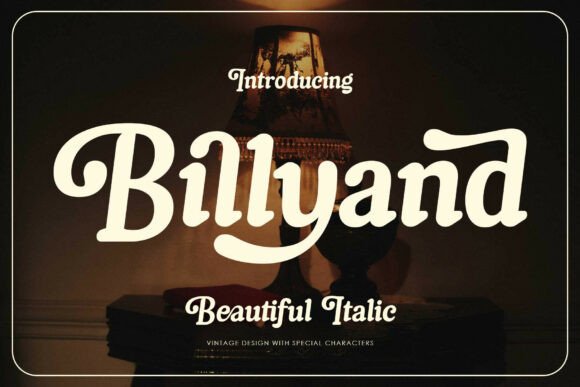
When it comes to typography, the right font can transform a simple design into something unforgettable. Billyand stands out as a refined vintage italic typeface that blends timeless elegance with bold personality. It brings together the grace of classic italic lettering and the visual punch of modern design, making it a versatile choice for everything from magazine covers to luxury packaging and boutique branding.
With its sweeping swashes, grounded weight, and rhythmic flow, Billyand offers a unique visual rhythm that draws the eye and enhances readability—especially in titles, pull-quotes, and branding elements. Whether you're designing for print or digital media, this font adapts effortlessly across a wide range of styles, from retro and vintage to minimalist and urban.
Common Missteps When Choosing and Using Billyand
Despite its beauty and versatility, Billyand can be misused or misunderstood, especially by those unfamiliar with its features or best practices for font implementation. Here are some of the most common mistakes designers and creators make—and how to avoid them.
Mistake 1: Assuming Billyand Works for Every Design Context
While Billyand is incredibly adaptable, it’s not a one-size-fits-all solution. Its decorative swashes and vintage character make it ideal for expressive titles, logos, and branding, but it may not be suitable for body text or small print.
Better Approach: Use Billyand for headlines, quotes, or design accents. Pair it with a clean sans-serif or serif font for body copy to maintain readability and visual balance.
Mistake 2: Overlooking the Importance of Kerning and Spacing
Billyand's sweeping swashes and italic slant can create awkward spacing if not adjusted properly. Failing to manually tweak the kerning can lead to a cluttered or uneven appearance, especially in logo work or signage.
Better Approach: Always review spacing manually when working with decorative fonts. Use tracking and kerning tools to ensure a clean, professional look—particularly when the font is used at large sizes or in prominent design elements.
Mistake 3: Not Taking Advantage of Alternate Characters
Billyand comes packed with a rich set of alternates and swash characters, but many users stick to the default glyphs, missing out on the font’s full expressive potential.
Better Approach: Explore the glyph palette in your design software to access swashes, ligatures, and alternate letters. These features allow for more creative and personalized typographic compositions, especially in logos or custom quotes.
Mistake 4: Ignoring Licensing and Usage Rights
Fonts come with specific licensing terms, and Billyand is no exception. Some users download or purchase the font without checking whether the license covers commercial use, web embedding, or merchandise printing.
Better Approach: Always verify the licensing agreement before using Billyand in a project. If you're using it for branding, apparel, or digital marketing, ensure you have the appropriate license to avoid legal issues down the line.
Mistake 5: Using It Without Considering the Overall Design Aesthetic
Because Billyand has such a strong personality, it can easily overpower a design if not used thoughtfully. Some designers use it in projects where a more subdued font would be more effective, resulting in a mismatched or chaotic look.
Better Approach: Consider the tone and purpose of your design before choosing Billyand. It works best in projects that aim to evoke elegance, nostalgia, or sophistication—such as vintage packaging, cafe branding, or lifestyle magazines.
What to Check Before Downloading or Buying Billyand
- Font Format: Ensure Billyand is available in the format you need (OTF, TTF, etc.) for compatibility with your software.
- Character Set: Confirm that the font includes uppercase, lowercase, numbers, punctuation, and special characters you may need.
- Ligatures and Swashes: Look for access to alternate characters and PUA-encoded glyphs to maximize design flexibility.
- Licensing Terms: Review the usage rights to ensure they align with your intended application—whether personal, commercial, or web-based.
- Vendor Reputation: Purchase from a trusted source to ensure file integrity and customer support.
How to Get the Most Out of Billyand
To truly harness the power of Billyand, consider these practical tips for implementation:
- Pair It Thoughtfully: Combine Billyand with complementary fonts that balance its decorative nature. Try a modern sans-serif or a clean script for contrast and readability.
- Test in Different Sizes: Preview the font at various sizes to see how it performs in different contexts, especially for print and signage.
- Use in Motion Graphics: Billyand’s elegant flow makes it a great choice for animated titles and on-screen text. Use its swashes to add visual interest in video projects.
- Customize with Alternates: Experiment with alternate characters and ligatures to create unique typographic layouts that stand out.
- Stay Consistent: If using Billyand across multiple branding materials, maintain consistency in weight, spacing, and color to reinforce brand identity.
Final Thoughts: Billyand Is More Than Just a Pretty Font
Billyand isn’t just another decorative typeface—it’s a design tool that brings elegance, confidence, and versatility to your creative projects. By understanding its strengths and avoiding common pitfalls, you can make the most of its vintage charm and modern adaptability.
Whether you're crafting a luxury brand identity, designing a retro-themed poster, or developing packaging for a boutique product, Billyand offers a unique blend of style and function. Take the time to explore its features, test it in real-world applications, and pair it wisely to ensure your designs leave a lasting impression.