Foggi: A Bold Font with a Purpose—Avoiding Common Pitfalls
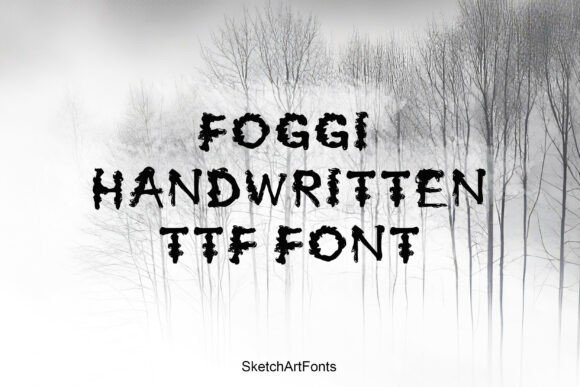
When you're looking to make a strong visual statement, the Foggi font stands out as a compelling choice. This high-impact, handwritten display typeface is designed to command attention. With its uneven, distressed edges and blotchy texture, Foggi mimics the chaotic beauty of ink or paint bleeding on paper. It’s ideal for horror movie titles, aggressive sports graphics, grunge music branding, and other projects that demand a dark, textured aesthetic.
However, despite its visual power, Foggi isn't a one-size-fits-all solution. Like any specialized font, it requires thoughtful application. Misusing it can lead to unintended consequences—poor readability, visual clutter, or a mismatched brand tone. Understanding how to work with Foggi effectively can make the difference between a striking design and a confusing one.
Common Mistakes When Using Foggi
Many designers and creators are drawn to Foggi for its raw, edgy look. But without careful consideration, even the most visually appealing fonts can fall flat. Here are some of the most common mistakes people make when working with Foggi:
1. Using Foggi for Long Blocks of Text
Foggi is a display font, not a body font. Its textured, uneven strokes are meant to grab attention in short bursts—like headlines or titles. Attempting to use it for paragraphs or lengthy captions can strain the reader's eyes and reduce clarity.
Better approach: Reserve Foggi for headlines, logos, or short phrases. Pair it with a clean sans-serif or serif font for supporting text to maintain readability and contrast.
2. Overlooking Licensing Details
Before downloading or purchasing Foggi, it's crucial to check the licensing terms. Some versions may be free for personal use but require a commercial license for business applications. Ignoring this can lead to legal issues or unexpected costs later.
Better approach: Always verify the font’s license type. If you're using Foggi for branding, marketing materials, or digital products, ensure you have the appropriate permissions.
3. Ignoring Context and Brand Alignment
Foggi’s aggressive, chaotic look may not align with every brand or message. Using it for a soft, minimalist, or professional brand can create visual dissonance and confuse your audience.
Better approach: Consider your brand personality and the emotional tone of your project. Foggi works best when paired with imagery and color schemes that reinforce its mood—think dark palettes, gritty textures, and high-contrast visuals.
4. Applying Foggi Without Adjusting Kerning or Spacing
Due to its irregular design, Foggi may require manual adjustments to spacing and kerning to ensure optimal legibility and visual balance. Failing to do so can result in uneven text that looks unpolished.
Better approach: Take time to fine-tune character spacing, especially in logo designs or key titles. Use tracking adjustments to prevent letters from appearing too cramped or too spread out.
Choosing the Right Version of Foggi
There are multiple sources where you can find Foggi, including free font platforms and commercial design marketplaces. However, not all versions are created equal. Some may lack character sets, stylistic alternates, or proper technical support.
What to check before downloading:
- Character set completeness: Ensure the font includes uppercase, lowercase, numbers, and punctuation if needed.
- File format: Look for OpenType (.otf) or TrueType (.ttf) files, which offer better compatibility across design software.
- Designer reputation: Download from trusted sources or directly from the font creator to ensure quality and security.
Practical Tips for Using Foggi Effectively
Now that you know what to avoid, here are some actionable strategies for getting the most out of Foggi:
Pair Foggi with Complementary Fonts
Because of its intense presence, Foggi works best when balanced with a simpler, more legible font. For example, use Foggi for a headline and pair it with a clean, modern sans-serif like Montserrat or Lato for subheadings or body copy.
Test Across Different Backgrounds and Sizes
Foggi’s texture can interact differently depending on the background color or resolution. Always test it on light and dark backgrounds, and at various sizes to ensure it remains legible and impactful.
Use Effects Sparingly
Since Foggi already has a distressed, textured appearance, adding drop shadows, glows, or gradients can overwhelm the design. Keep effects minimal unless you're aiming for an intentionally chaotic look.
Consider Vector Formats for Logos
If you're using Foggi in a logo, consider converting the text to outlines or using vector-based files (like SVG or EPS) to preserve its quality across different applications and sizes.
Final Thoughts: Foggi Isn’t Just a Font—It’s a Statement
Foggi is more than just a typeface; it’s a design tool that communicates urgency, chaos, and intensity. When used correctly, it can elevate your project from ordinary to unforgettable. But like any powerful visual element, it requires careful handling.
By avoiding common mistakes—such as misusing it in body text, ignoring licensing terms, or failing to adjust spacing—you’ll ensure your design remains professional, effective, and aligned with your creative goals. Always take the time to test, adjust, and evaluate how Foggi fits within the broader visual narrative you're building.
If you're looking to inject a raw, textured aesthetic into your next design, Foggi is worth exploring. Just remember: its strength lies in its boldness. Use it intentionally, and it will serve your message well.