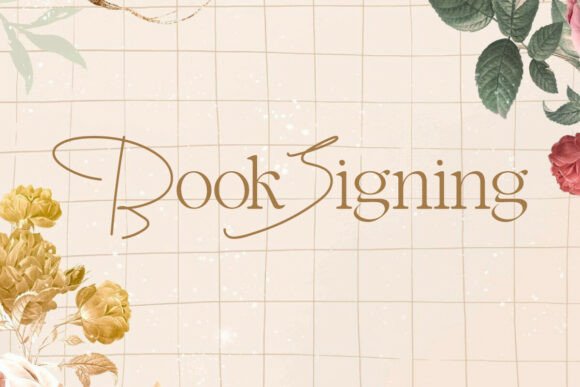
Book Signing: A Typeface for Literary Elegance and Visual Impact
Understanding Book Signing and Its Appeal
Book Signing is more than just a font—it's a visual statement. With its ultra-thin hairlines and elongated serifs, this typeface evokes a sense of editorial refinement and artistic craftsmanship. It's particularly popular among designers working on book covers, fashion magazines, and upscale branding materials. The font’s custom-lettered appearance, enhanced by unique ligatures and sweeping terminals, makes it a go-to choice for those aiming to elevate their designs from standard to sophisticated.
Designers and creators are drawn to Book Signing because of its high-contrast aesthetic and delicate details. However, like any specialized tool, its effectiveness depends on how well it's understood and applied. Missteps in usage can lead to poor readability, mismatched pairings, or licensing issues that undermine the intended impact.
Common Mistakes When Choosing and Using Book Signing
One of the most frequent errors is selecting Book Signing for the wrong context. While it shines in editorial and branding work, it's not suited for body text or small print. Its thin strokes and fine serifs can become illegible at smaller sizes or on low-resolution displays. Designers sometimes overlook this, only to find their elegant headlines disappear into the background when printed or viewed on mobile devices.
Another common oversight is improper pairing. Book Signing's dramatic contrast and decorative elements demand a complementary font that balances its visual weight. Using it alongside a busy or overly stylized typeface can create visual clutter rather than a refined hierarchy.
Overlooking Technical Details
Many designers skip the technical aspects of font use, especially when it comes to licensing. Book Signing, like many premium fonts, may come with specific usage rights. Failing to verify whether a license covers commercial use, web embedding, or resale in templates can lead to legal complications down the line.
Also, some users underestimate the importance of PUA encoding. Book Signing includes this feature, allowing easy access to special characters and ligatures without needing advanced software. However, if not properly implemented in the design workflow, these decorative elements may not display correctly, especially across different platforms or applications.
Designing Without Purposeful Contrast
One of the defining features of Book Signing is its high contrast between thick and thin strokes. This makes it ideal for creating visual interest, but only when used with intentional contrast in layout. A common mistake is placing Book Signing text over complex backgrounds or alongside competing design elements. The result is often a loss of clarity and visual dominance.
For best results, consider using a wide-tracked serif or a light, neutral background when working with Book Signing. These choices help the font stand out and maintain its elegant presence without being overwhelmed by surrounding elements.
Practical Tips for Getting the Most from Book Signing
- Use it at appropriate sizes: Stick to headlines, titles, and large-format branding where the font’s details can be fully appreciated.
- Pair thoughtfully: Balance Book Signing with simpler, wide-set serifs or clean sans-serif fonts to maintain hierarchy and readability.
- Check licensing before use: Confirm whether your intended application—whether print, web, or commercial—is covered under the font’s license terms.
- Leverage PUA-encoded characters: Explore the decorative ligatures and alternate glyphs to enhance the typographic quality of your design without extra effort.
- Avoid complex backgrounds: Keep the surrounding design minimal to ensure the font remains legible and impactful.
Better Approaches to Font Evaluation and Selection
Before committing to Book Signing, test it in context. Create mockups at actual usage sizes and in the intended environment—whether that's a printed book cover, a digital magazine header, or an event invitation. This helps identify any legibility issues early on.
Compare Book Signing with similar fonts to ensure it's the best fit for your project. Some alternatives may offer similar elegance with better technical flexibility or broader licensing terms. However, if you're seeking that specific blend of literary sophistication and editorial flair, Book Signing often stands out as the superior choice.
Final Considerations Before Downloading or Purchasing
Before downloading or purchasing Book Signing, check the font vendor’s reputation. Reputable sources provide clear licensing terms, sample previews, and customer support. Also, verify that the font includes all necessary weights and styles for your project. Some versions may lack bold or italic variants, limiting design flexibility.
If you're unsure about committing to a purchase, look for trial versions or demo licenses. These allow you to test the font in real-world applications without financial risk. Always keep a record of your font licenses—especially for collaborative or commercial work—to ensure compliance and avoid future disputes.
Conclusion: Elevating Design with Thoughtful Typography
Book Signing offers a rare combination of elegance and impact, making it a favorite among designers who understand its strengths and limitations. By avoiding common mistakes—such as improper sizing, poor pairing, and licensing oversights—you can ensure that your use of this typeface enhances rather than hinders your project.
Typography is more than just choosing a pretty font; it's about communication, clarity, and visual harmony. When used correctly, Book Signing can transform a simple headline into a memorable statement. Approach it with care, and you'll unlock a level of sophistication that sets your work apart.